Simple and practical cybersecurity guides for small and medium-sized businesses that want to reduce cyber risk without building a large internal security team. We cover MFA, backups, phishing, password policies, Microsoft 365 security, employee training, basic risk assessment and minimum incident response planning.
How to Protect a Small Business from Hackers: 4 Entry Points
How can a small business reduce the risk of being hacked? Review four entry points: email accounts, employee devices, internet-facing services and remote support tools. This guide explains which safeguards make entry harder, what limits the consequences of account compromise and when incident response is needed. It includes questions for your IT provider, an access-review scenario and guidance on free CERT Polska services. The focus is practical protection, not promises of complete security or buying tools before understanding the problem.
Prepared by: CCyber Editorial Team
To reduce the risk of a small business being hacked, establish how an unauthorized person could reach its money, documents and systems. Start with email accounts, work devices, internet-facing services and providers’ remote access.
Then determine what would block entry, who would notice suspicious activity and how the consequences would be limited if the first safeguard failed. The objective is not to promise that nobody can hack the company. It is to reduce the likelihood of compromise and prepare an effective response.
20 September 2026
The recommendations draw on NCSC, CISA and CERT Polska guidance, together with Microsoft and Google documentation. The four entry points are CCyber’s way of organizing the topic, not a statistical ranking. The business scenario and proposed review scope are illustrative.
Small business owners, office managers and people overseeing outsourced IT support. It is particularly relevant to organizations using email, online banking, cloud applications and remote access that have not considered what compromising one of those components would enable.
A small company can operate almost entirely through online services: email, accounting, an online store, shared storage and social media. This model still requires account and data protection. It is the setting addressed by the NCSC guide to using online services safely.
We suggest starting with three questions: who can initiate a payment, who can download important documents and who can change how a service operates? The answers identify accounts and permissions that deserve priority.
Do not equate every scam with a system breach. A message impersonating a supplier can cause financial loss without compromising a business account. Technical safeguards therefore need to work alongside approval procedures for important transactions.
An unauthorized person accesses a mailbox and uses its correspondence to impersonate the business convincingly. They may also try to recover access to other services linked to that mailbox. These consequences are described in the NCSC email security guide.
Start with strong authentication. For supported accounts, consider phishing-resistant methods such as passkeys or security keys. Where a service uses a password, it should be unique and supported by MFA. Also review alternative sign-in methods and recovery after a phone is lost.
Do not overlook the domain-management account. NCSC explains that control of a domain can support the hijacking of websites, email and related services. The organization should retain control of access even where a contractor originally registered the domain. See the domain protection guide.
“Which accounts can change our email and domain settings or recover other accounts? How is each of those paths protected?”
Ask for the scope and exceptions, not just confirmation that MFA is enabled. Related guidance is available in the Identity, Access and Cloud Security category.
An employee signs in correctly, but malware is running on the computer. It can steal session information, which allows the service to recognize an already authenticated user. Under certain conditions, an attacker can reuse that information without entering the password again. The mechanism is explained in Google’s discussion of browser-session protection.
This is not an argument against MFA. It is a reason to protect the device, browser and software-installation process too.
Use work devices whose security condition the organization can assess. Maintain supported software, updates and active protection against malicious code. Do not access business services from a random hotel computer or a device shared by multiple unrelated users. These practices are described in the NCSC guide to defending accounts from malware.
We also recommend an agreed approval process for applications and browser extensions. A personal computer needs defined conditions for business access, not an assumption that it is safe because it has a password.
“Which devices can access our most important accounts, and do we know that their protection is operating?”
Also establish who receives security-tool warnings. A purchased licence without configuration and operational ownership is not a completed process.
It could involve an outdated website panel, an old test system, a remote-access appliance or an unnecessarily exposed remote desktop service. An employee click need not be the prerequisite for entry. CISA identifies internet-facing vulnerabilities and misconfigurations as an initial access route in its #StopRansomware Guide.
Establish which business services are reachable from the internet, why they exist and who maintains them. Remove unnecessary exposure. Required services need current software and access restrictions appropriate to their purpose.
Do not leave an ordinary remote desktop service as an unrestricted entrance to the business. Moving it to another port does not replace access controls. A VPN also requires secure configuration and updates rather than being treated as a standalone guarantee of protection.
“What can be discovered and reached from the internet, who owns each component and when was its security last checked?”
Agree the assessment scope. Do not commission arbitrary scanning of a customer’s infrastructure or intensive production testing without appropriate arrangements.
A program allowing a technician to connect to a computer can be entirely legitimate. The problem is how it is used: a compromised provider account or an unauthorized person persuading an employee to grant access. Abuse of these tools is addressed in the joint NSA, CISA and partner guidance.
Maintain a list of approved tools, people and access purposes. Establish when a provider may connect without an employee present, which permissions are available and how completed activities can be reviewed.
Following an unexpected “technical support” call, an employee should verify the request through a known provider contact. They should not install a new program or share the computer solely because the caller sounds convincing.
The review should not indiscriminately remove every support tool. It should distinguish authorized maintenance from uncontrolled access and provide a way to revoke that access.
“Who can connect to our computers today, and what is required to remove that capability effectively?”
Check the answer using a test account or an agreed termination of access. Do not accidentally disable access required to maintain an important service.
Polish organizations can use moje.cert.pl, which provides free scanning of their own domains and notifications about detected threats. The service also covers information about leaked credentials and publicly visible infrastructure.
We recommend having the domain administrator configure the service and assigning someone to receive its reports. Agree the scope and service conditions first, particularly where an external provider operates the infrastructure.
No detected issue does not mean there is no route into the business. This review does not independently establish laptop security, appropriate permissions across every application or data-recovery capability. Use the results to generate actions, not as a certificate covering the whole organization.
Use separate accounts for everyday work and administration. Match permissions to tasks. NCSC recommends this separation to reduce the consequences of a routine account being compromised in its important-account protection guide.
We also suggest checking whether guest devices and equipment that does not need company documents are effectively separated from them. A different Wi-Fi network name does not by itself demonstrate that separation.
Confirm supplier bank-detail changes and unusual payment requests through an independent, previously known channel. Do not rely solely on a number supplied in the message being checked. This practice is described in the NIST phishing guide.
In our proposed review, include deputies, time pressure and transactions performed by the business owner, rather than testing only the standard procedure.
Establish with IT whether compromising a routine account would also allow backups to be deleted. Test restoration into a secure environment. NCSC recommends an independent copy of important information and a known recovery method in its critical-data guidance.
A backup can help recover information, but it cannot undo earlier data theft or a completed fraudulent transfer. It complements access protection rather than replacing it.
Illustrative CCyber scenario. An 18-person services company uses business email, cloud storage and an external IT provider. It wants to understand the consequences of an ordinary employee account being compromised.
The administrator creates a test account with corresponding permissions. The review requires neither password theft nor malware installation. It checks accessible folders, administrative functions and the ability to share information outside the organization.
In this scenario, the account can access another department’s documents, while the person covering for the accountant has no instructions for confirming bank-detail changes. The company corrects the access and agrees a deputy procedure.
The result is not a declaration that the business is immune to attack. It is a reduction in specific consequences of account compromise and a list of further questions to investigate.
The following wording can support agreement on a review. It is not a penetration-testing authorization or permission to interfere with third-party systems.
Suggested request: “Please review unauthorized access paths to our email, important applications and computers. We want to establish authentication coverage, device condition, internet-facing services and contractors’ remote access. Please distinguish verified configurations from areas that have not yet been assessed.”
“For each gap, please identify the potential consequence, proposed action, delivery owner and verification method. Agree the scope, timing and operational impact before testing. We also need to know who receives urgent reports and how contact works outside normal service hours.”
Scope and cost should reflect the services and checks involved. An automated website scan alone will not answer every question.
First respond to a suspected active compromise. Unrecognized account changes, unauthorized messages or unexpected remote access need incident handling rather than waiting for a scheduled review.
Then address known significant gaps. Priorities may include unprotected administrative access, a critically vulnerable internet-facing service or an old contractor account. Agree the sequence with someone who understands the operational impact of changes.
Then verify ongoing maintenance. Who will notice a new service, an employee departure or a security-tool failure? Without these arrangements, a previously sound configuration can stop reflecting the actual environment.
This is a suggested prioritization approach, not a universal timetable. It should produce decisions rather than another shopping list.
Contact IT or the incident owner through a known channel, preferably from a device you do not suspect has been compromised. Record the time, observed symptoms and actions taken. Do not delete messages or reinstall equipment before agreeing how relevant information will be preserved.
Changing the password alone may not end the incident. Microsoft’s response guidance also includes revoking sessions and reviewing MFA methods, application permissions and mail-forwarding rules. See the Microsoft 365 compromised-account procedure.
If money is at risk, contact the bank immediately through a known channel. In Poland, incidents can also be reported through CERT Polska’s channels. External contact does not replace internal response or separate assessment of applicable notification duties.
Do not independently shut down industrial, medical or other equipment whose interruption could endanger people or processes. Containment decisions must account for its function.
Everyday working rules and baseline protection are explored in the Cybersecurity for SMEs category. This article focuses on entry paths and the consequences of compromised access rather than repeating a complete cyber hygiene checklist.
Procedures and exercises can also draw on the incident response and business continuity resources. The linked CCyber blog categories are in Polish.
Through its cybersecurity services for SMEs, CCyber combines technical support with clear rules and responsibilities.
Identify where unauthorized access to your business could begin. To scope a review, prepare your important-service list, IT support model and known issues. The objective should be an agreed improvement plan and a way to verify it. Do not send passwords or customer data before secure working arrangements have been agreed.
There is no basis for that guarantee. Organizations can reduce entry paths, limit the consequences of compromised access and prepare a response. Replace promises of complete protection with a defined safeguard scope and verification method.
They do not address every scenario described here. Authentication, permissions, transaction approval and remote access require their own safeguards. Legitimate support software can be used for an unauthorized purpose.
No. A VPN protects a defined communication or access path. It does not replace cloud-account security, device protection or maintenance of the VPN service itself.
First review existing capabilities, configuration and actual gaps. A purchase may be necessary, but it should address an identified problem and include operational arrangements. Compare implementation, maintenance and testing costs, not licences alone.
No. The result concerns specified assets, tests and a particular point in time. It does not automatically establish the security of accounts, devices, providers or business processes.
Protecting a small business from hackers begins with understanding how someone could access its accounts, devices and services. The four entry points help structure the conversation with IT and select improvements relevant to the actual environment.
Instead of asking only “Do we have safeguards?”, ask “What blocks entry, what limits access and who responds?”. Verified answers provide more value than a promise that one tool will protect the entire company.
5 Cybersecurity Tips for Small Businesses: A Practical Guide
How can a small business improve cyber hygiene without starting a large security project? Protect accounts, organize updates, test data recovery, independently verify unusual requests and establish how problems should be reported. Each step explains what the business owner or IT provider should do, what employees need to know and how to check the result. The guide also includes a fraudulent-invoice scenario and a practical routine for maintaining safeguards.
Prepared by: CCyber Editorial Team
Start improving small-business cyber hygiene with five actions: protect accounts, update devices, check backups, verify unusual requests and report problems promptly. For each one, establish who configures the safeguards, what employees should do and how completion will be checked.
The business owner does not need to perform every task. IT or an external provider handles some activities. Employees should know which tools to use, when to pause a suspicious operation and whom to contact. These five steps provide a starting point, not a guarantee of protection against every attack.
19 September 2026
The recommendations draw on NCSC, NIST and CERT Polska guidance. The selection of five steps, examples and proposed review routine are CCyber recommendations. They are not a complete audit or an exhaustive list of organizational obligations.
Small business owners, office managers and people working with outsourced IT providers. It is particularly relevant to teams using business email, cloud applications, online banking and customer information who need clear everyday working rules.
Email deserves priority because it can be used to recover access to other services. A compromised mailbox can also send messages in the company’s name. These dependencies are highlighted in the NCSC email security guide.
What to do: ask IT to enable and verify multi-factor authentication, or MFA, for email, administrators and other important services. Where supported, consider phishing-resistant methods such as passkeys or security keys. Protect the process for recovering an account after a phone is lost.
For accounts that use passwords, choose long, unique passwords stored in an approved password manager. Do not reuse the same password across work and personal services. Support for password managers is also covered in the NIST authentication guidelines.
Employee rule: do not approve a sign-in you did not initiate or give authentication codes to someone contacting you. Report unexpected requests to confirm access.
How to check: ask the administrator to identify protected accounts, exceptions and recovery arrangements. When an employee leaves, ensure unnecessary access is removed, including from services purchased outside IT. Such reviews are recommended in the NCSC guidance on business accounts.
Security updates fix defects that could be exploited in an attack. Browsers and applications need updates alongside operating systems. Supported software and automatic updates are covered in the NCSC device protection guide.
What to do: prepare a simple list of business computers and phones with IT and identify who maintains them. Agree automatic updates where appropriate. For servers and business-critical applications, arrange controlled deployment rather than making unplanned changes during operations.
Separate everyday work from administrative privileges. Remove unnecessary applications and enable device locking. Limiting routine use of administrator accounts is addressed in the NCSC access guidance.
Employee rule: do not postpone an agreed restart indefinitely or install software simply because someone sent a link. Report update problems to IT.
How to check: select several devices with the administrator and confirm that updates were actually installed. “Automatic updates are enabled” does not establish whether failures or pending restarts remain.
Storing information in the cloud does not remove the need to check recovery. Version history and recycle bins can help, but have defined limits. NCSC recommends an independent copy of important data and an established recovery method rather than relying solely on a service’s basic features.
What to do: identify information needed to resume work, such as order documents, correspondence or accounting-system data. Establish backup coverage, frequency, access and protection against deletion. The NCSC critical-data guide provides a useful reference.
If using an external drive for backups, do not leave it continuously connected to an everyday computer. Protecting backup media and checking restoration are discussed in the NCSC backup guide.
Employee rule: save business materials in approved locations, not only on a desktop or personal drive. IT needs to know where information requiring protection is stored.
How to check: agree the restoration of a selected dataset to a secure test location. Open the documents and confirm that they are usable for work. Record the outcome and duration. Do not overwrite production data. The test verifies its defined scope, not recovery of the entire business.
A message can look credible and still be fraudulent. NIST notes that AI can help create convincing phishing content. Correct spelling, a logo and a familiar name are therefore insufficient verification. See the NIST small-business phishing guide.
What to do: require independent confirmation of supplier bank-detail changes, unusual transfers and requests for confidential information. Use a previously known channel. Do not rely solely on the phone number or link included in the message being checked, consistent with NCSC guidance on suspicious requests.
Employee rule: urgency does not cancel verification. Access banking and important applications through a known address, bookmark or official app rather than an unexpected link.
How to check: discuss a fictional bank-detail change with the finance team. Ask whom the employee would call, where the number would come from and what happens when the approver is unavailable. This is a process exercise, without real transfers or password collection.
Employees do not need to prove an attack before asking for help. NIST recommends preparing people to report suspected phishing exposure as well as confirmed mistakes. Response planning should establish roles and contacts, as explained in the NCSC guidance for smaller organizations.
What to do: prepare a short instruction with an IT contact, deputy, service hours and a communication method for when email is unavailable. Agree who can make urgent decisions. Make clear that promptly reporting a mistake is the expected behaviour.
Employee rule: report immediately after entering a password on a suspicious site, unexpectedly approving a sign-in or sending a document to the wrong person. Provide the time, application and actions taken. Do not include passwords or authentication codes in the report.
If financial fraud is suspected, contact the bank promptly through a known channel. In Poland, suspicious messages and incidents can also be reported through CERT Polska’s channels, and text messages containing malicious links can be forwarded to 8080. External reporting does not replace the company’s own response.
How to check: run an announced contact test. Confirm that the report reaches someone able to act, including when the main administrator is unavailable.
Illustrative CCyber scenario. An employee receives a message claiming that a supplier has changed its bank account. The message contains correct order details and requests urgent payment.
Instead of judging only its appearance, the employee follows the agreed procedure. They call a contact already recorded in the supplier documentation. They learn that no change was requested, stop the payment and submit the message for investigation.
In this scenario, the important elements are a clear procedure, an available contact and the ability to pause payment. The employee is not expected to determine independently how the sender’s identity was impersonated.
To begin: record an owner, next action and verification date for each of the five steps. Distinguish “not checked” from “not working”. Do not expect employees to guess settings that an administrator can verify.
During everyday work: follow the rules for sign-ins, data storage, request verification and reporting. When someone leaves or an application changes, review the associated access and data protection arrangements.
For recurring reviews: we suggest a monthly discussion of unresolved issues, new accounts, service changes and results from scheduled tests. This is a CCyber organizational recommendation, not a universal frequency for every security activity. Do not wait for a review meeting to respond to an incident.
A simple register can record the action, responsible person, deadline and result. Do not include passwords, recovery codes or unnecessary customer information.
Account and permission practices are explored in the Identity, Access and Cloud Security category. For testing and preparation, see the material on incident response and business continuity.
The Cybersecurity for SMEs category provides broader small-business guidance. This mini-guide focuses on everyday rules and initial verification. The linked CCyber resources are in Polish.
Through its cybersecurity services for SMEs, CCyber supports risk assessment, safeguard implementation, working rules and employee training.
Start by checking these five foundations in your company. Prepare a list of important applications, details of existing IT support and questions you cannot yet answer with evidence. This helps establish the work required before purchasing additional tools.
The business owner can establish some rules, but configuration and testing should involve a competent administrator or provider. Agree the service scope and how completion will be demonstrated rather than assuming everything is included in an existing subscription.
No. Device protection does not replace account security, data recovery or payment verification. NIST recommends combining technical protection, authentication and employee preparation.
No. Do not expect people to identify every fraudulent message. Training should teach safe verification and reporting, while configuration limits opportunities for misuse and its consequences.
No. They provide a starting scope. Further action depends on services, information, providers and organizational requirements. An initial review should show what works, what has not been checked and what needs further attention.
Cyber hygiene is not a one-off training session or an expectation that everyone will always remain vigilant. Connect account protection, updates, recovery, request verification and reporting with clear responsibility.
Choose one safeguard today whose operation you cannot confirm. Decide who will check it and when. That is a practical first step towards better security.
WEF Global Cybersecurity Outlook 2026: 7 Priorities for Boards
What does the WEF Global Cybersecurity Outlook 2026 mean for board decisions? This guide examines seven areas: AI, geopolitics, fraud, cyber resilience, suppliers, capability gaps and emerging threats. It separates survey findings from CCyber recommendations and translates them into actions, ownership and measures. A board decision template and a shared-provider risk scenario help connect the report with practical planning. Global survey results are not treated as an assessment of an individual Polish company.
Prepared by: CCyber Editorial Team
The WEF Global Cybersecurity Outlook 2026 highlights that organizational resilience depends not only on internal safeguards, but also on decisions about AI, suppliers, skills and collaboration. It connects technology with economic and geopolitical considerations rather than reducing cybersecurity to another tool purchase.
For boards, we propose a practical application: select scenarios relevant to the business, verify response capabilities and decide what needs improvement. Survey findings should help frame better questions. They do not replace an organization’s risk assessment or evidence that its safeguards operate.
19 September 2026
This article draws on the Global Cybersecurity Outlook 2026, published on 12 January 2026 by the World Economic Forum in collaboration with Accenture. It follows the seven themes in the report’s main analysis. Proposed actions, the decision template and the business scenario are CCyber recommendations, not WEF research findings.
Boards, business owners, CISOs, IT managers and people responsible for risk, operations and procurement. It is particularly relevant to organizations that want to use research to establish priorities rather than simply add percentages to a presentation.
The survey ran from 25 August to 1 October 2025. Its qualified dataset comprised 804 participants from 92 countries, including 105 CEOs and 316 CISOs. Expert discussions and workshops supplemented the survey. Details appear in the WEF methodology.
“2026” in the title does not mean every response was collected in 2026. Some questions looked back over 12 months, while others concerned expectations. Comparisons between editions should not be assumed to track an identical group of companies. Global findings are not a representative assessment of Poland’s market.
Cyber-enabled fraud and phishing rank first among CEOs’ concerns in the report. Ransomware remains first for CISOs, followed by supply chain risk. This ranks concerns, not incident volumes. The comparison appears in the chapter on CEOs’ perspectives.
CCyber recommendation: when setting the budget, ask finance, operations and security to describe the consequences of the same scenarios. For a fraudulent payment, examine losses and approval arrangements. For ransomware, examine the ability to fulfil orders. Do not decide which function is right solely by comparing positions in a ranking.
WEF finding: 94% of respondents expected AI to be the most significant driver of cybersecurity change in the coming year. Processes for assessing AI tool security were reported by 64%, compared with 37% in the previous edition. See the WEF key findings.
CCyber recommendation: separate three questions: how you protect your own AI applications, how you use AI for security and how you prepare for its use by attackers. Select one operational use case and review its input data, permissions, responsibility for outputs and the ability to stop automation.
For an alert-analysis tool, do not assess speed alone. Test an incorrect recommendation and establish who can challenge it. For an agent performing actions, check which operations need approval and who can revoke its access.
Evidence of progress: a documented assessment of the specific use case and a test of its limits. “AI approved” does not describe the scope of a decision. Further examples are available in the AI Security and Emerging Threats category.
WEF finding: 64% of surveyed organizations account for geopolitically motivated attacks in their risk-mitigation strategies. The report also examines technology dependencies and digital sovereignty. Context is provided in the WEF overview of cyber risk in 2026.
CCyber recommendation: do not begin with a general declaration that geopolitical risk is high. Identify a service whose loss would materially disrupt operations. Examine dependencies on infrastructure location, provider support, connectivity and data portability.
When choosing a local or sovereign solution, require an explanation of the specific problem it should resolve. A provider change should not be treated as a completed risk action without migration testing and assessment of new dependencies.
Evidence of progress: a defined service-loss scenario, an agreed response and verified limitations of the fallback option.
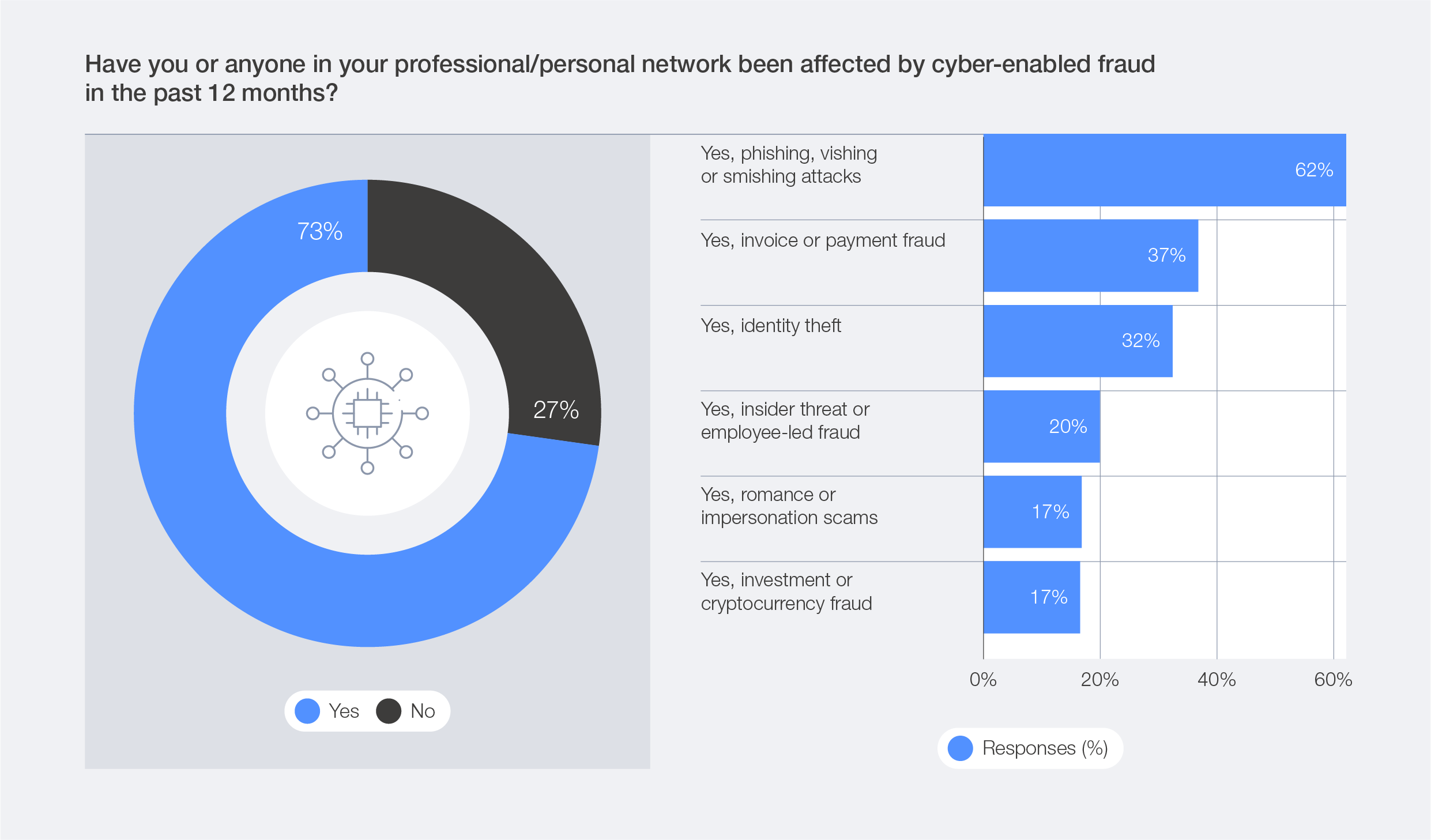
WEF finding: 73% of respondents said that they or someone in their professional or personal network had been affected by cyber-enabled fraud during the previous 12 months. That is the question shown in Figure 21. It does not mean that 73% of surveyed companies suffered a breach.
CCyber recommendation: review supplier bank-detail changes, urgent transfers and account recovery with the finance team. Design verification through a previously agreed channel rather than a number or link supplied in a suspicious message.
Run an authorized exercise using test data. Include time pressure and deputy arrangements. Do not base approval of an important operation solely on recognizing a voice, image or writing style.
Evidence of progress: the payment-approval test result and a list of exceptions that still permit the procedure to be bypassed. Employee preparation is explored in the Training and Cyber Awareness category.
WEF finding: the resilience chapter connects cybersecurity with economic value. Among organizations with industrial environments, only 16% reported informing their boards about OT security issues. The data and context appear in Section 3.4.
CCyber recommendation: select a service important to revenue, customer commitments or process safety. Establish how long it can remain unavailable, what is needed to restart it and who authorizes contingency operation.
Connect recovery testing with acceptance by the business process owner. In an industrial environment, agree the scope with operations and those responsible for human safety. Do not conduct destructive testing on a live installation.
Evidence of progress: a record confirming the agreed service capability, not merely restoration of a server. See the resources on incident response and business continuity.
WEF finding: 65% of large companies by revenue identified third-party and supply chain vulnerabilities as their greatest resilience challenge, compared with 54% in the previous edition. WEF also highlights concentration risk. These findings are summarized in the report’s accompanying announcement.
CCyber recommendation: beyond assessing each provider individually, check whether several important services use the same subcontractor, cloud infrastructure or authentication mechanism. Two separate contracts should not be the sole evidence of independence.
Ask providers about practical incident cooperation: contacts, information sharing, data recovery and participation in exercises. Supplement the questionnaire with verification of a selected scenario.
Evidence of progress: a map of shared dependencies for a critical service and the result of an agreed provider exercise. Record information gaps explicitly rather than replacing them with an assumption of security.
WEF finding: in its comparison of smaller and larger organizations, 46% and 29% respectively reported cybersecurity skills shortages. The broader disparity in access to capabilities is described as cyber inequity. See the WEF analysis. This grouping does not correspond to Poland’s legal SME definition.
CCyber recommendation: list activities the organization cannot currently perform instead of assessing the gap only through vacancy counts. Examples include evaluating an incident, conducting recovery and verifying permissions.
For each gap, choose an approach: develop the internal team, obtain specialist support or use a managed service. Agree availability and outcomes. With a smaller partner, consider a joint exercise or phased requirements rather than sending only an extensive questionnaire.
Evidence of progress: a defined activity has an owner, a deputy and a verified delivery method. Hiring someone or signing a subscription does not by itself complete that assessment.
WEF outlook: Section 3.7 considers scenarios through 2030 involving autonomous systems and robotics, digital currencies, space and undersea infrastructure, climate and quantum technologies. These are forecasts, not confirmation that every described outcome has occurred. See the final part of the trends chapter.
CCyber recommendation: select areas genuinely connected with your business. A manufacturer of long-lived devices could begin with update capabilities and cryptographic dependencies. A logistics company could examine positioning, connectivity and automated decisions.
Do not justify an expensive purchase merely because a technology appears in the report. First identify the asset, its expected lifetime, potential consequences and the condition that should trigger further action.
Evidence of progress: an emerging-risk register with owners and reassessment dates, rather than a general slide about future threats.
We recommend discussing a few scenarios connected with specific services rather than presenting every statistic in sequence. Prepare a short decision record for each one.
Service and consequence: what would stop working or could be lost?
Dependency: which system, provider, access path or capability gap matters?
Current knowledge: what was verified, on which date and what remains unknown?
Decision: what action is proposed, and which alternatives are being rejected?
Ownership and resources: who delivers the result, who accepts it and what support is required?
Acceptance criterion: how will the organization establish that the action achieved its intended outcome?
This template does not prescribe a universal cybersecurity percentage of the IT budget. First describe the need and alternatives. Then estimate implementation, operation, internal staff time and testing.
Illustrative CCyber scenario, not a description of a real client. A company purchases customer management and order-processing applications from two different suppliers. Its documentation treats them as independent.
A review establishes that both use the same infrastructure subcontractor. A service-loss exercise shows that one disruption could stop both order intake and fulfilment. The team has contacts for both suppliers but has not agreed the sequence for restoring operations.
The company does not automatically decide to change technology. It first establishes data-export options, an acceptable manual operating mode and communication arrangements. Only then does it use the exercise results to assess whether another technical option is necessary.
The value of the review lies in identifying a shared dependency and testing the response, not merely expanding the supplier register.
Select an important service and its associated AI use case, payment process or provider. Collect existing assessments and evidence. Record gaps, but do not assume that every missing document means the underlying safeguard is absent.
Conduct an agreed response exercise, recovery test or operational approval check. Include the process owner and relevant provider. Adapt the test to the environment so that normal operations are not put at risk.
Recheck corrections, present remaining limitations and approve further priorities. Extend the review to other services according to risk. This is a proposed work plan, not a reason to postpone action on an active incident.
We suggest tracking the proportion of important services with successful recovery tests, AI use cases with current assessments, critical providers with tested escalation and significant activities with an assigned owner and deputy.
Every measure needs a scope, denominator and date. Do not extrapolate one application’s result to the entire environment. Measure recovery against an agreed start and finish, not only the tool’s processing time.
Separate declaration, implementation and verification. This is a practical rule for our proposed reporting model, not a new WEF metric.
Strategy, accountability and supplier management are explored in the Cyber Risk, Governance and vCISO category. The AI and incident-response guides help move from priority selection to detailed implementation. The linked CCyber blog resources are in Polish.
This article reviews the report and proposes how to use it in planning. It does not replace an assessment of the organization’s applicable regulatory obligations.
Through its vCISO service, CCyber supports strategy, risk and supplier management, security measures and board reporting.
Translate the report into priorities for your own organization. Important services, the current security plan and unanswered questions can provide a starting point for defining the engagement. The objective should be decisions and verifiable actions, not another trends presentation.
It should not be interpreted that way. It covers a global respondent group rather than a representative sample of Polish enterprises. It can help identify questions for your own review.
WEF identifies differences between CEO and CISO priorities. It does not determine which threat must matter most to an individual organization. That requires assessment of its processes and potential consequences.
A trend alone is insufficient. First define the task, intended outcome and consequences of incorrect operation. Then test the solution within a controlled scope and plan how it will be operated.
We do not recommend that approach. Select related scenarios affecting important services. One exercise may reveal gaps in ownership, access and supplier cooperation without requiring three separate initiatives.
No. They are forward-looking perspectives. Distinguish survey data from opinions and scenarios, and update decisions as new information becomes available.
The WEF conclusion emphasizes leadership, skills and collaboration in collective resilience. Its perspective extends beyond an individual organization’s protection in isolation from its partners.
Our recommendation is to finish reading with a decision to test a specific scenario. Select the service, identify dependencies, assign responsibilities and verify the outcome. That makes the global research useful to the business rather than leaving it as a collection of statistics.
Small Business Cybersecurity Toolkit: Checklist and Password Policy [PDF]
Download the Small Business Cybersecurity Toolkit: a 12-question checklist, risk record, sample password and access policy, and worksheets covering backups, incidents and IT providers. Learn how to complete the materials, choose initial actions and verify their results. The toolkit helps organize security without starting with extensive documentation. It does not replace an audit or a complete ISMS, but gives the business owner and IT contact a shared starting point.
Prepared by: CCyber Editorial Team
The Small Business Cybersecurity Toolkit is a set of worksheets that turns “Are we protected?” into specific actions. It includes a risk checklist, sample password and access policy, risk record, critical service inventory and worksheets covering recovery, incidents and IT providers.
The material supports an initial review and organizes follow-up work. It does not automatically assess the company’s security or demonstrate legal compliance. The important result is not a completed PDF. It is agreement on what needs to change, who is responsible and how completion will be verified.
19 September 2026
The toolkit is an original CCyber working resource. Technical recommendations draw on public guidance from NIST, CERT Polska, NCSC and CISA. The selected questions, worksheets and work plan are CCyber proposals, not official forms or a certification scheme.
Small business owners, office managers, IT managers and organizations using outsourced IT support. It is particularly useful for teams that already have business email, cloud applications, customer data and backups but lack a shared picture of their security arrangements.
The worksheets can support a discussion with an IT provider, an internal review or an initial action plan. In larger or highly regulated organizations, they are a supporting resource rather than a complete management system.
Download the English PDF: checklist, password policy and working templates
Download the Polish version of the toolkit
Each version contains 12 pages. Print the worksheets or add text and marks using a PDF reader. The files do not contain interactive form fields. Blank worksheets may be copied for your organization’s internal use.
The sample policy remains a draft until it has been adapted to the business and approved by the appropriate person.
Pages 2-3 cover account access, MFA, updates, backups, phishing response and provider arrangements. Each question has space for a status and supporting evidence or a gap description.
Page 4 helps develop a finding into a risk scenario: what could happen, how it would affect the company, which safeguards already operate and what should happen next.
Page 5 identifies services the business cannot operate normally without. It connects the business process with its system, provider, owner, access protection and backups. It is a starting inventory, not a complete record of the entire environment.
Page 6 contains user rules and space for approval, ownership and a review date. Page 7 helps establish whether those rules are enforced in applications and where technical limitations remain.
Page 8 records what was restored, the expected result, the actual test duration and whether the process owner confirmed that the recovered data was usable.
Page 9 provides space for contacts and basic actions after suspicious activity is noticed. Complete it before an incident, while roles and communication arrangements can be agreed calmly.
Page 10 helps establish who patches systems, handles backups and receives alerts. It also includes a short checklist for ending a working relationship.
Page 11 records three priority actions, their owners, deadlines and verification criteria. Page 12 explains basic terms and links to supporting sources.
Start by defining the scope. Record the company, location, service or group of systems being reviewed. Otherwise, “we have MFA” may describe email while excluding administrator access to the backup platform.
Include someone who understands the business process and someone responsible for IT. The business owner can assess the consequences of downtime, while an administrator can verify configurations. Neither perspective replaces the other.
Connecting business needs with security management follows the direction of the NIST CSF 2.0 Small Business Quick-Start Guide. Our checklist is a simplified starting tool, not a reproduction of every element of that framework.
For a positive answer, record what was checked, when and where the evidence is available. This might be a configuration report, access-review record or test result.
Select “partly” when a safeguard covers only some systems. Select “unknown” when information is unavailable. Where a question does not apply to the scope, record a reason rather than automatically selecting “yes”.
One serious gap can matter more than several functioning safeguards. The toolkit therefore does not produce a result such as “the company is 83% secure”.
After the review, choose actions based on potential consequences, exposure and urgency. A suspected active incident requires a response rather than waiting for the checklist to be completed.
“No MFA” describes a gap. “Compromise of a payment approver’s email could enable a fraudulent transfer instruction” describes a scenario and possible business consequence.
Illustrative example: a company uses email to coordinate payments with suppliers. Nobody has confirmed whether MFA is enforced. A change to bank details can also be accepted based on an email alone.
The risk record should identify two actions: verify and implement appropriate authentication, and independently confirm bank-detail changes. Each action needs an owner and a verification method. This is more useful than a generic task to “improve cybersecurity”.
Explain the basis for any likelihood assessment. Mark missing information as unknown. Do not classify risk as low merely because the company does not remember a previous incident.
The toolkit separates user rules from administrator tasks. Employees receive guidance on behaviour, while IT receives a list of configuration checks.
The template adopts a minimum of 15 characters for user-account passwords. This is a proposed organization-wide baseline, including with MFA. NIST SP 800-63B-4 distinguishes single-factor passwords, which require at least 15 characters, from passwords used as part of MFA, for which it allows at least 8.
The policy calls for unique passwords, an approved manager and no mandatory character-type combinations as the basis of protection. The approach is described in NIST SP 800-63B-4. These are technical guidelines, not a universal legal requirement for every Polish business.
The template does not impose password changes every 30, 60 or 90 days unless a separate binding requirement applies. Suspected credential exposure, however, requires immediate reporting and action under the response procedure.
Reviewing a policy and forcing every password to change are different activities. The document may need updating even where user-password resets are unnecessary.
The toolkit covers MFA for email, remote access and critical accounts. It also distinguishes phishing-resistant methods such as FIDO2 from one-time codes and approval notifications. The differences are explained in CERT Polska’s secure-access guidance.
The policy includes account recovery and departure arrangements. Its password-length rules should not automatically be applied to device PINs, API keys or service-account secrets. Those areas require separate rules.
NCSC recommends understanding how critical data can be recovered rather than relying solely on the basic recovery mechanisms of an online service. A backup should support a defined recovery need. See the NCSC guidance on protecting critical data.
The CCyber worksheet therefore records more than the backup date. It asks for target and actual recovery time, data scope and the outcome of a business check.
Example: a file has been restored but cannot be opened in the required application, or associated data is missing. The test should not be marked successful merely because the file appears in a folder.
Agree the test with IT and the process owner. Do not overwrite production data while independently working through the template.
Complete contacts, deputies and service hours before an incident. Ensure authorized people can access the card when business email is unavailable.
The card prompts rapid reporting, interruption of risky activity and preservation of evidence. It does not replace a technical response procedure. Ransomware containment and evidence-preservation guidance is provided in the CISA #StopRansomware Guide.
Do not independently shut down production systems, OT or medical devices. Isolation decisions in these environments must account for the safety of people and processes.
The toolkit identifies CERT Polska’s general reporting channel but does not determine the notification obligations of a specific organization. The correct route, recipients and deadlines must be established separately.
Instead of asking “Is everything secure?”, review specific activities. Who patches systems? Who tests backups? Who receives warnings after hours? How is access removed when a working relationship ends?
Also establish service exclusions. An activity missing from the subscription does not necessarily indicate provider failure, but leaving it without an owner creates an organizational problem.
Record responsibilities, completion evidence and unresolved questions. This approach to supplier requirements is supported by NIST SP 1305 on cybersecurity supply chain risk management.
Appoint a coordinator, identify important services and complete the checklist. Record unknown areas and situations requiring urgent attention.
Approve the appropriate policy scope, review access and clarify provider arrangements. Record three actions rather than producing dozens of unassigned recommendations. Three actions are a way to start work, not a limit on the eventual security scope.
Perform agreed tests, review the results and confirm action closure. Distinguish “implemented” from “implemented and verified”. Set the next review and follow-up work.
This schedule is an organizational proposal. It does not extend legal deadlines or justify delaying a response to an active threat.
It is not an audit, certificate or complete ISMS. It does not provide a full assessment of NIS2, KSC, GDPR or sector-specific applicability. It does not perform technical testing or establish safeguard effectiveness without verification.
It can organize information for a subsequent review, risk assessment and implementation plan. Production systems, sensitive data, complex integrations or significant customer requirements may call for a broader assessment.
The blank toolkit is designed to be shared. A completed version may disclose weaknesses, providers, contacts and system dependencies. Store it in an approved location with restricted access.
In an evidence field, record a report location or ticket reference rather than full customer data, passwords, MFA codes or keys. Limit information shared with advisers to the necessary scope and agree a secure transfer channel.
Further guidance is available in the Cybersecurity for SMEs category. Accounts, permissions and data recovery are explored in the identity, access and cloud security category. These links lead to Polish-language resources.
This article focuses on using the worksheets. The objective is not to copy every piece of guidance into documentation, but to connect relevant rules with the company’s actual environment.
Through its cybersecurity support for SMEs, CCyber helps with risk assessment, safeguard implementation, policies and training.
Turn identified gaps into an implementation plan. The review scope and questions the business could not answer provide a useful starting point. Do not send the complete pack or confidential information before agreeing how it should be transferred.
Yes. The owner or coordinator can complete the business sections. Configuration checks and technical tests still require someone responsible for IT. Technical answers should not be guessed.
No. It must be adapted, approved, communicated and implemented in systems. The IT worksheet helps identify differences between policy statements and actual configuration.
No. The toolkit does not cover every obligation and is not a certification tool. It identifies selected gaps and supports action planning.
Identify who can provide information and evidence. Start with business-critical services, access and data recovery. Missing information is a starting point for verification, not a reason to select “yes”.
Yes, for internal organizational use. Record the review scope so that a partial check is not later mistaken for an assessment of the entire company.
A practical toolkit does not replace security with paperwork. It helps establish what the business does not know, what needs to improve and who should take the next step.
The most useful outcome is verified operation: improved access control, usable data recovery, agreed provider responsibilities or a tested incident contact. The completed worksheet should document that result, not substitute for it.
NIS2 for Polish SMEs: 5 Overlooked Risks and a 30-Day Action Plan
MFA, backups and an IT support contract are not enough to establish NIS2 readiness. Access may remain active after an employee leaves, cloud services may be missing from the inventory, and security alerts may reach an unmonitored mailbox. This guide examines five overlooked risks, explains how to verify them and provides a plan for the first 30 days. Each area connects an action with ownership and evidence. The aim is to accelerate implementation of Poland’s KSC requirements, not promise full compliance after completing five tasks.
Prepared by: CCyber Editorial Team
An SME can accelerate NIS2 preparation by checking not only whether safeguards exist, but also what they cover and whether they work. First establish whether the company falls within Poland’s National Cybersecurity System Act, known as KSC. Then review five areas: access remaining after a working relationship ends, unclear IT provider responsibilities, unrecorded systems, incomplete data recovery and alerts without an agreed response.
The first 30 days should identify these gaps, address the most urgent ones, assign responsibility and verify completed actions. This is an implementation stage, not a universal route to full compliance. The remaining obligations, sector-specific requirements and deadlines still need to be incorporated into the security programme.
19 September 2026
The five risks below are an editorial checklist, not a statistical ranking of incidents affecting Polish SMEs. The scenarios and schedule are practical recommendations. Legal requirements and technical guidance are identified in the sources.
SME owners and boards, IT managers and people coordinating NIS2 and KSC preparation. It is particularly relevant to companies using outsourced IT support that already have baseline safeguards but do not know whether these cover every important system and scenario.
The article also supports suppliers to larger organizations that receive security questionnaires and need answers backed by evidence rather than declarations.
NIS2 is an EU directive. For a Polish company, practical obligations arise primarily from the National Cybersecurity System Act and the provisions applicable to its activities.
It is not enough to say “we are an SME” or “we have fewer than 50 employees”. The assessment must consider the services provided, sector, size criteria and exceptions. For linked or partner enterprises, the relevant assessment rules and statutory exclusions must also be considered. Refer to Article 5 and the annexes to KSC.
A customer requirement is not the same as statutory applicability. A larger customer may require safeguards through a contract, but supplying that customer does not automatically make the supplier an essential or important entity.
For organizations covered by the relevant transition period, entities required to self-register must submit their KSC register application by 3 October 2026. The same route does not apply to entities registered by the authority. See the Ministry of Digital Affairs communication on self-registration.
Entities meeting the criteria when the amendment entered into force must implement their obligations by 3 April 2027 under the applicable schedule. Rules for organizations meeting the criteria later require separate verification. Use the official KSC timeline, rather than calculating deadlines solely from the start of your project.
An employee returns their laptop and their email account is blocked. The company considers offboarding complete. However, a local application account, an active session or a credential used by an integration remains available.
Blocking one account does not always terminate every access path. Microsoft Entra documentation explains that applications may manage their own sessions, and effective access removal also depends on how application accounts and tokens are handled. A single change in the user directory should not be assumed to revoke access to every service immediately.
Compare current employees and contractors with accounts in your most important applications. Start with email, finance, customer management, remote access and administration. Separately review service accounts, API keys and permissions granted to applications operating without a person signing in.
Do not disable technical accounts indiscriminately. Establish their owners and dependencies first. Remove unnecessary access using the capabilities of each service, including the relevant sessions, tokens and integrations. The Microsoft Entra access revocation documentation provides a useful reference.
For user sign-ins, also check that MFA is enforced rather than merely registered. For sensitive access, consider phishing-resistant methods such as appropriately deployed FIDO2 security keys or passkeys. A conventional one-time code does not provide the same protection, as explained in Microsoft’s authentication-method guidance.
Ownership: the application owner and IT, with changes communicated by HR or the person managing the contractor relationship.
Completion evidence: an agreed account review, records of removed permissions and a controlled check confirming that the identified access path has been closed. Do not record passwords or token values in the action register.
A company pays a monthly IT support fee. Management assumes this covers all system updates, monitoring, backups and out-of-hours response. The provider delivers only the activities explicitly included in the agreement.
The problem is not necessarily poor provider performance. It may be a difference between the purchased service and the customer’s expectations. Similarly, giving a technician administrator access does not demonstrate that the company controls when and how that access is used.
Walk through a specific scenario with the provider: an account compromise detected on a Saturday. Establish who sees the alert, who contacts the company, who can block access and who preserves information needed for investigation.
Then check patching, backup and remote-access coverage. Identify systems excluded from the service, tasks retained by the customer and arrangements for ending the relationship. Record the necessary changes in an agreed service scope and appropriate contractual provisions.
This reflects the principle of defining supplier requirements and responsibilities described in NIST SP 1305 on cybersecurity supply chain risk management. NIST guidance is an organizational reference, not Polish law.
Ownership: the customer-side contract owner, supported by IT, security and legal advisers.
Completion evidence: an agreed division of responsibilities, service exclusions, current contacts and the result of an escalation check. A statement that the provider “handles security” does not replace these arrangements.
A patching report shows a good result, but covers only laptops. It excludes an old internet-facing test portal, a branch network device and an application purchased by the sales team.
An incomplete inventory can distort the picture of security. The organization assesses known systems without understanding how many important assets remain outside patching, access control or monitoring. Asset identification is emphasized by CIS Control 1 and NIST’s small-business guidance.
Do not start by buying a large platform. Compare information from service invoices, administration portals, device lists and discussions with process owners. Include cloud applications, domains, network devices, remote access and important integrations.
For each important asset, record its owner, purpose, data, business dependency and security maintenance arrangements. Establish who patches it and whether it remains supported by the vendor. The connection between software inventory and vulnerability management is explained in CIS Control 2.
Do not perform aggressive scanning of production systems, OT or a supplier’s environment without an agreed scope and authorization. A rapid review should not itself disrupt operations.
Ownership: IT together with process owners and those purchasing services.
Completion evidence: an agreed asset register, newly identified gaps and confirmation that unnecessary exposure has been removed or the system brought under appropriate maintenance. The report should also describe the review’s scope limitations.
A provider reports that backup jobs complete successfully. The company assumes it can recover after an incident. However, nobody has checked whether the backup includes cloud application data, how it can be accessed after an administrator account compromise or whether the restored information will be usable.
In cloud services, recycle bins, version history and synchronization can support recovery, but their scope and resistance to deletion must be checked. NCSC recommends verifying recovery of critical data and retaining an independent copy, rather than relying solely on a service’s basic recovery mechanisms.
Select one process whose loss would quickly affect the business, such as order handling. Identify the data, applications, configurations and access needed to resume it.
Define the required recovery time and acceptable data loss. Then conduct an agreed test in a safe environment. Check not only whether a file exists, but whether the required business activity can actually be performed.
Also establish whether compromise of an ordinary administrator account could allow backups to be destroyed. Select safeguards based on this scenario and recovery requirements, not on the assumption that every company needs the same product.
Ownership: IT or the provider performs recovery, and the process owner confirms that the result is usable.
Completion evidence: a record identifying scope, recovery point, actual duration, limitations and the business test result. A failed test should produce a specific remediation action.
A security tool sends an alert about a suspicious sign-in. It reaches a mailbox monitored only on working days. Nobody knows who should decide what happens outside office hours or whether the provider may block the account without prior approval.
Detecting an event and responding effectively are different capabilities. Defining roles, contacts and incident actions also forms the basis of the NCSC response and recovery guide for smaller organizations.
Assign someone to receive reports, a deputy and authority for technical decisions. Agree what requires immediate escalation, how out-of-hours coverage works and which communication channel remains available if email fails.
Conduct a short, agreed exercise. It should test the path from notification through decision-making to action, rather than only familiarity with a document. Employees should know where to report suspicious messages or their own mistakes without waiting for certainty that an attack has occurred.
Separately check external notification duties. KSC, GDPR and contractual requirements may have different triggers, recipients and deadlines. Readiness for the appropriate CSIRT and S46 should involve more than saving a website address.
Ownership: the incident coordinator, people authorized to take technical action and a designated management representative.
Completion evidence: the exercise timeline, confirmation of contact, decisions and improvement actions. Label the exercise as an exercise, and do not send fictional incidents through production reporting channels without agreement from the channel operator.
These areas relate to Article 21 of NIS2: access control, supply chain security, asset and vulnerability management, business continuity and incident handling. The directive also requires assessment of the effectiveness of adopted measures. The legal reference is Directive (EU) 2022/2555.
This is not the complete set of obligations. A KSC programme must address the appropriate ISMS scope, risk assessment, management, training, personnel requirements, reporting and any applicable audits. Assigning some activities to a provider does not remove management’s statutory accountability.
Quick actions should accelerate that programme, not replace it with a five-point declaration.
This plan assumes access to information about the environment and participation from the business, IT and the main provider. Delivery time depends on organizational scale and the gaps identified. Active threats require immediate action, regardless of the planned sequence.
Confirm KSC applicability and the company’s deadlines. Where self-registration by 3 October 2026 applies, give it priority. Appoint a programme coordinator and someone authorized to approve business decisions.
Select the most important processes and systems for the initial review. Do not confuse this stage’s limited scope with the final scope of statutory obligations.
Compare accounts with authorized users, review integrations and verify MFA enforcement. Expand the inventory to include applications, services and devices omitted from existing reports.
Record each finding as a specific action: what it concerns, who will complete it, by when and how the result will be verified.
Agree the main IT provider’s responsibilities and service exclusions. Test recovery of a selected process. Check whether the result meets the business need.
Changes requiring contract negotiation, system replacement or a larger deployment belong in the follow-up plan. Recording a remediation deadline does not itself remove the risk.
Run an incident exercise and recheck the most important corrections. Prepare a report separating completed actions, remaining gaps and areas not yet verified.
Approve the follow-up schedule, budget and owners. The subsequent plan should cover all applicable obligations, not only these five scenarios.
The example below shows how to replace a vague task such as “improve access” with an action that can be accepted and verified.
Risk: a former contractor’s account still permits access to the customer management system.
Action: identify all associated access paths, remove unnecessary permissions and revoke the relevant sessions and credentials.
Owner: the system administrator, with approval from the business owner.
Deadline: based on assessed urgency, with immediate response where misuse is suspected.
Acceptance criterion: a controlled check confirms that unauthorized access is unavailable across the agreed scope.
Evidence: the change record, verification result and identification of the applications checked. No passwords or secret values.
Management should receive information about the most urgent risks, completed actions, test results and decisions needed to continue the work. A document count is not sufficient.
It is useful to distinguish three states: implemented and verified, implemented but not yet verified, and not implemented or unknown. This helps prevent a purchased service from being reported as an operational safeguard.
Do not calculate a “NIS2 compliance percentage” from the five points in this article. Such a limited checklist does not cover every obligation or the company’s entire environment.
First review the capabilities already available: access enforcement, administrator reporting, event logging, backups and data exports. Only then assess what is genuinely missing.
We recommend a shared action register for IT, security and providers, supported by short decision reviews. One improvement may support several requirements, but its scope must be explicit. Correcting access to one application does not mean all access across the company has been addressed.
Reduce duplicated work, not verification. Prioritization means choosing a deliberate sequence, not permanently omitting obligations.
The Cybersecurity for SMEs category also contains a NIS2 applicability guide and an article on five baseline security actions. This article addresses the next stage: checking gaps that remain despite those foundations.
Account and data-recovery reviews can be supported by resources on identity, access and cloud security. For response testing, see the material on incidents, ransomware and business continuity. These links lead to the Polish-language blog categories.
The CCyber NIS2 compliance programme includes readiness assessment and action planning. A starting point can be establishing the applicable obligations, reviewing significant gaps and assigning responsibility for their closure.
Identify what is actually holding back your company’s KSC preparation. A discussion about support should start with critical services, current providers and applicable deadlines. The objective should be a plan based on the actual environment, not the purchase of a generic document package.
There is no universal answer. A company with mature processes may need limited improvements, while an organization without foundations needs a broader programme. This article’s plan supports an initial stage and does not guarantee compliance.
No. Statutory status must be assessed against the legal criteria. Customer contractual requirements are separate and may oblige the supplier to implement safeguards and provide evidence.
It can use external support, but should designate an internal coordinator and business decision-makers. Establish who can access configurations, implement changes and verify results.
NIS2 does not impose a general requirement for every SME to operate an internal security operations centre. It requires appropriate capabilities and measures, with the scope determined by applicable rules and risk. Monitoring without an agreed response does not resolve the issue, however.
Document the impact, owner, deadline, any temporary safeguards and verification method. Check that the schedule meets statutory deadlines. Internal risk acceptance does not remove a legal obligation.
Faster NIS2 preparation does not mean skipping requirements. It means removing uncertainty: who has access, which systems exist, what the provider is responsible for, what can be recovered and who will respond to an incident.
The most useful quick action ends with a verified result. Access revoked, responsibilities agreed, protection coverage extended, recovery working or escalation tested. These results provide a foundation for implementing the ISMS and the remaining KSC obligations.
We write about regulations such as NIS2, DORA, CRA and ISO 27001, cybersecurity for SMEs and critical infrastructure, as well as cyber hygiene, emerging threats and building security awareness within organisations.
Every article delivers practical knowledge - no jargon, just concrete steps you can act on to effectively protect your data, people and business continuity.